
FeiyuTech’s Scorp Mini 3 Pro is pitched as a flagship universal gimbal, capable of stabilizing everything from action cameras to smartphones and mirrorless rigs. After spending a few weeks with a review unit they sent over, I put this all-in-one stabilizer through its paces to see if it lives up to the hype. Here’s my in-depth, first-person take on the Scorp Mini 3 Pro: its design, performance, standout features, and how it compares to other 2025 flagship gimbals.
Introduction and First Impressions

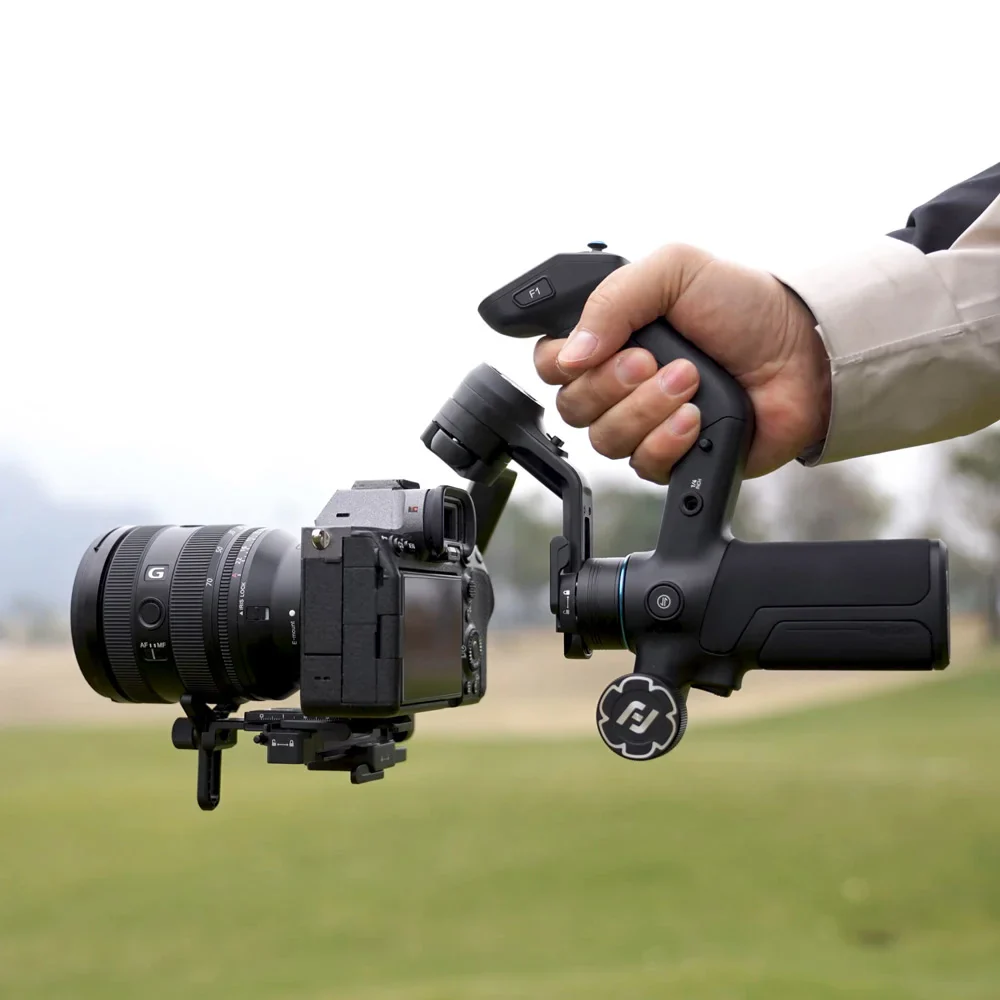
I unboxed the Scorp Mini 3 Pro with high expectations. FeiyuTech is marketing it as a versatile 3-axis gimbal for content creators of all stripes – whether you shoot on a mirrorless camera, a GoPro, or just your phone . Right away, I noticed this isn’t a flimsy phone gimbal; it’s solidly built from a combination of synthetic resin and aluminum alloy, giving it a sturdy, professional feel . At about 1 kg (2.2 lbs) for the gimbal itself, it’s not the lightest stabilizer I’ve used, but that heft comes with the promise of supporting up to a 2 kg (4.4 lb) payload . In theory, that means the Scorp Mini 3 Pro can handle my full-frame mirrorless camera with a mid-sized lens, which immediately sets it apart from typical smartphone-only gimbals.
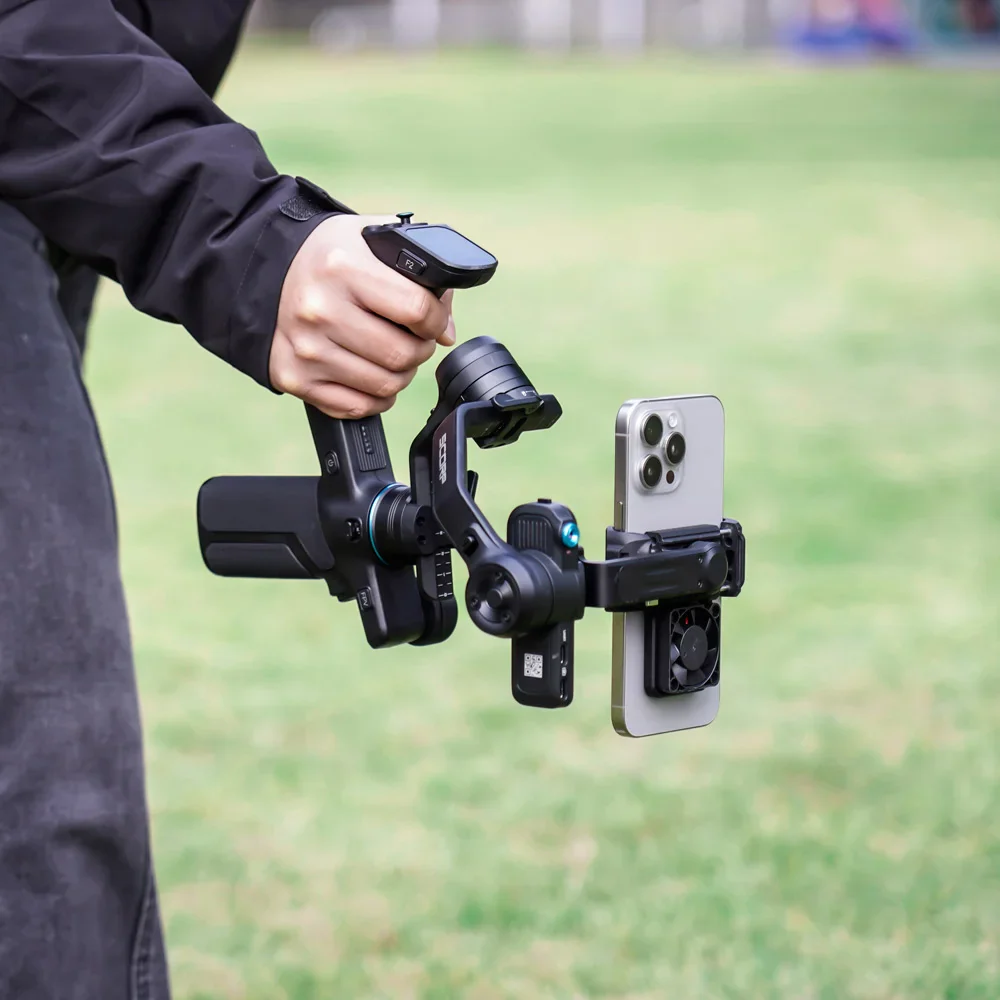
Despite being dubbed “Mini,” this gimbal definitely leans towards the mirrorless camera side of its personality. It’s compact compared to full-size DSLR gimbals, yet a bit overbuilt if you only intend to use it with a phone. I could tell from the first grip that FeiyuTech designed it for hybrid creators – people like me who might one day mount a Sony A7 or Canon R-series camera, and the next day just want to grab some smooth phone B-roll. In other words, the Scorp Mini 3 Pro is a single device that aims to replace multiple gimbals in a creator’s kit . That versatility is a huge selling point, especially if you produce a mix of content (vlogs, travel videos, short films) and use different cameras.
Key Features at a Glance
- Four-in-One Compatibility: Supports mirrorless, compact, smartphone, and action cameras with included adapters for quick device swaps.
- 2 kg Payload Capacity: Handles up to 4.4 lbs, easily supporting most mirrorless setups or phones without strain.
- Built-in AI Tracking 4.0: Integrated AI module tracks subjects hands-free with 0.003 s response and gesture control—ideal for solo creators.
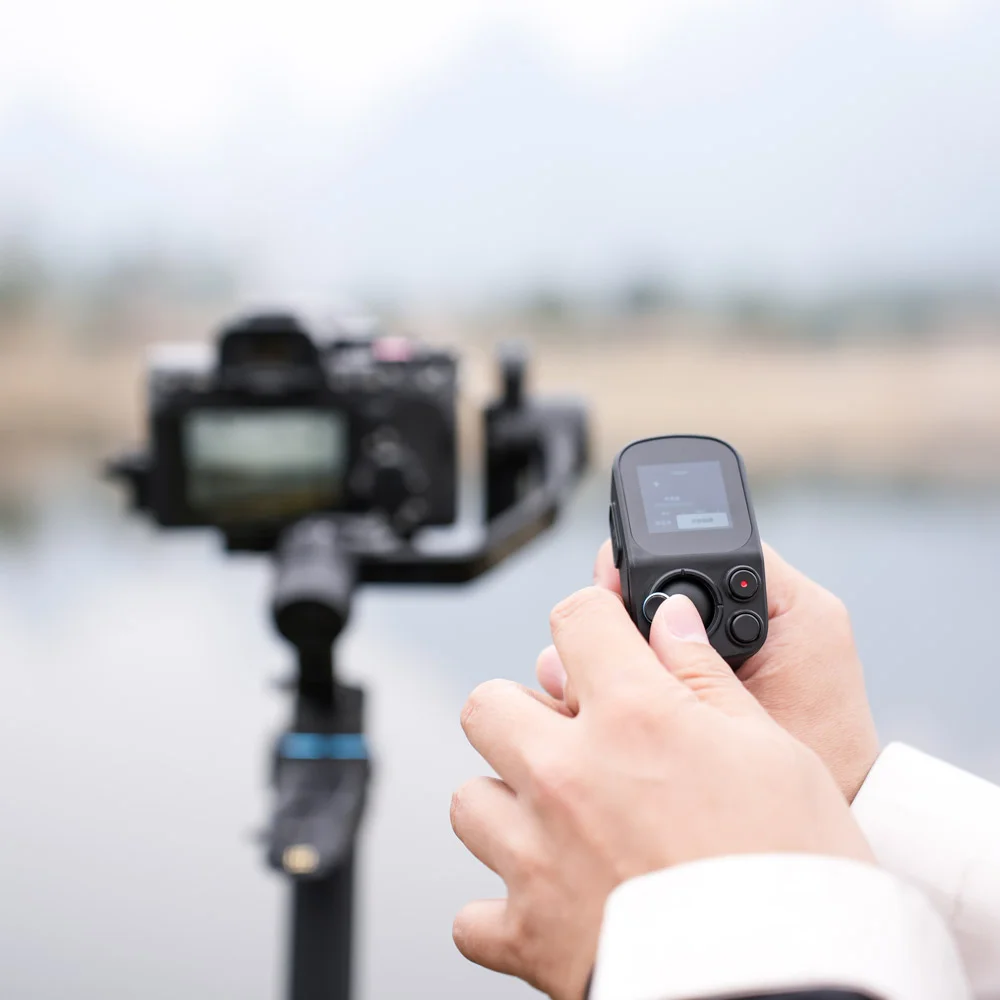
- Detachable Underslung Handle/Remote: Sling-style handle doubles as a wireless remote for low-angle or tripod-mounted shots.
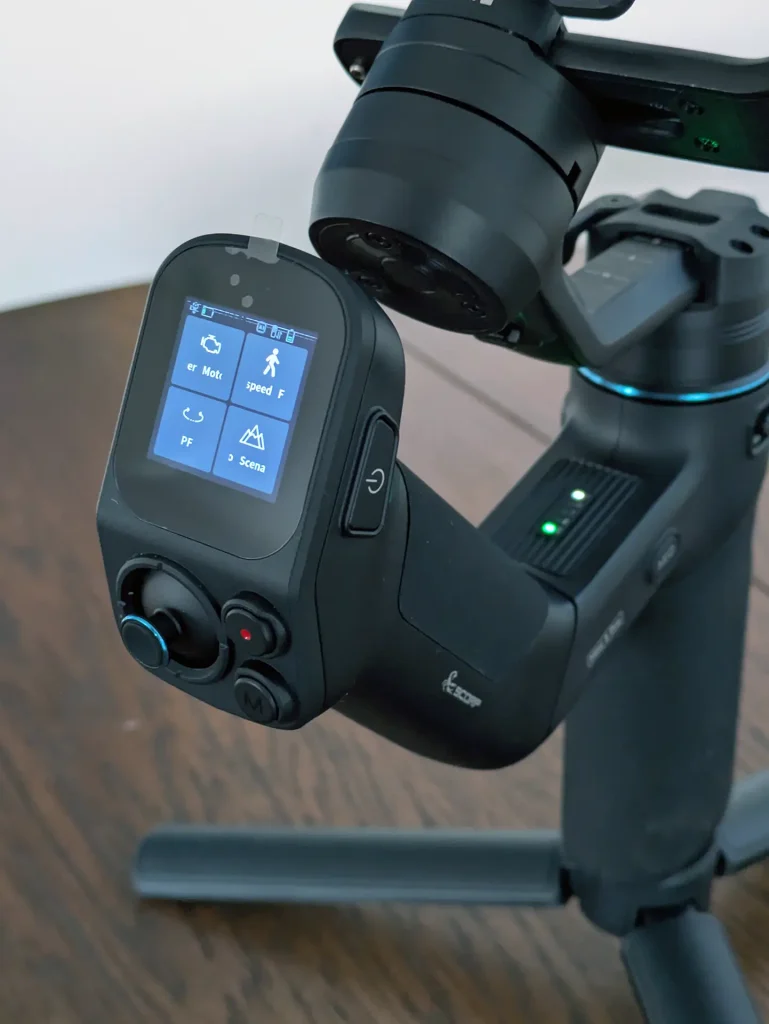
- 1.3-inch OLED Touchscreen: Responsive display for mode switching, tuning, and quick setting adjustments without the app.
- Multi-Function Control Wheel: Assignable knob for roll, tilt, zoom, or focus—perfect for fine control or horizon leveling.
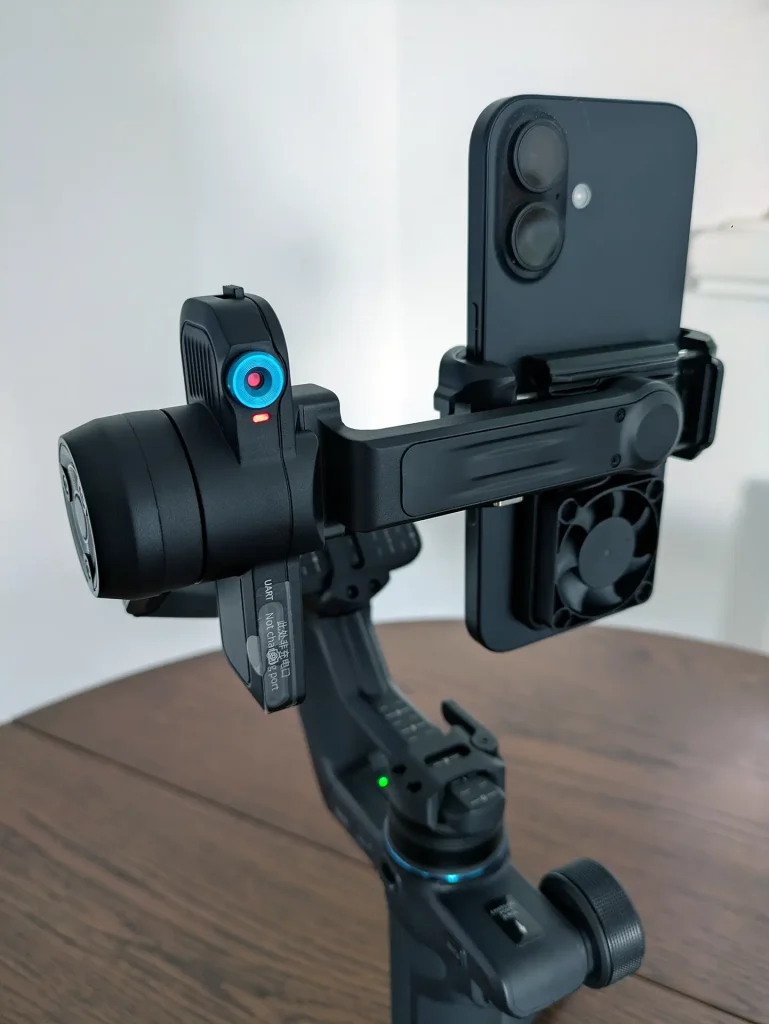
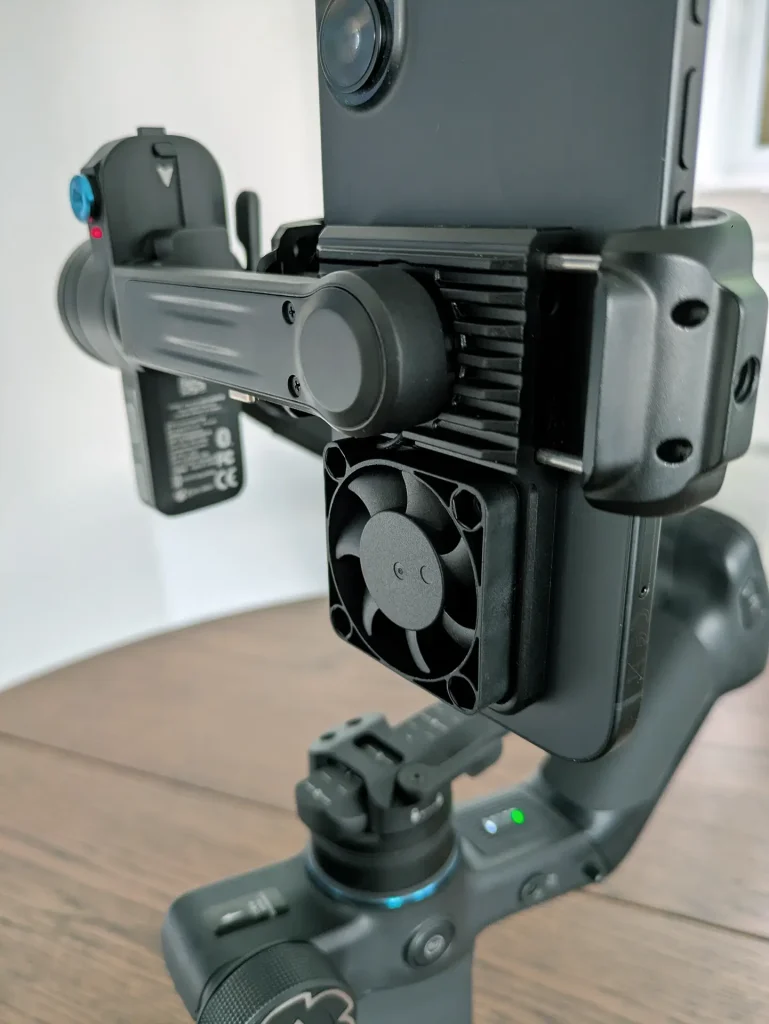
- Built-in Cooling Fan for Phones: Integrated fan prevents overheating during long 4K shoots—great for mobile videographers.
- All-Day Battery Life: 4500 mAh battery delivers up to 14 hours of runtime with fast USB-C charging.
- Refined Build & Locks: Buckle-style locks and metal hardware make setup fast, transport secure, and the overall build rock-solid.
As you can see, on paper the Scorp Mini 3 Pro is loaded with features and thoughtful design touches. But how does all of this translate into real-world use? Let’s get into my experience using the gimbal in a variety of shooting scenarios.
Design, Handling, and Setup
The Scorp Mini 3 Pro has a distinct design compared to the typical pistol-grip gimbals. The underslung “hook” handle immediately stands out. In use, I found this sling-style handle extremely useful for getting low-angle shots. I could hold the main grip with one hand and grab the underslung handle with the other to skim the camera just above ground level for a dramatic low tracking shot. The handle’s shape and rubberized texture give a secure hold. One minor ergonomic gripe: the clearance between that side handle and the rear motor isn’t very large. I have average-sized hands, and if I wasn’t mindful of my grip, my knuckles would bump the rear arm occasionally . It’s not a deal-breaker, but if you have really large hands or are in a hurry, you might notice this tight clearance.
Balancing the FeiyuTech Scorp Mini 3 Pro
Balancing the gimbal for the first time was straightforward. FeiyuTech provides a sliding quick-release plate (and even an extension plate for larger cameras). I mounted my camera, unlocked the axes, and within a couple of minutes I had each axis balanced. If you’ve balanced any 3-axis gimbal before, this is familiar territory. The new buckle locks on each arm not only make setup faster but also ensure the axes don’t flop around when locked. After balancing, a quick tap on the touchscreen to run the auto-tune function and the Scorp Mini 3 Pro was ready to roll. In fact, I was impressed by how fast I went from unboxing to filming — “up and running in seconds” is how one other reviewer described it, and I’d agree it’s one of the quicker gimbals to get going.
Once powered on, the Mini 3 Pro enters a standby mode. A neat addition is the row of status indicator LEDs on the base of the gimbal. These tiny lights show you which mode you’re in (PF, PTF, Lock, POV, etc.) and also indicate things like Bluetooth connection and battery level . It’s a thoughtful design touch that helps at a glance – for instance, if the blue light is on, I know the Bluetooth shutter connection to my camera or phone is active. Small details like this made the user experience smoother.
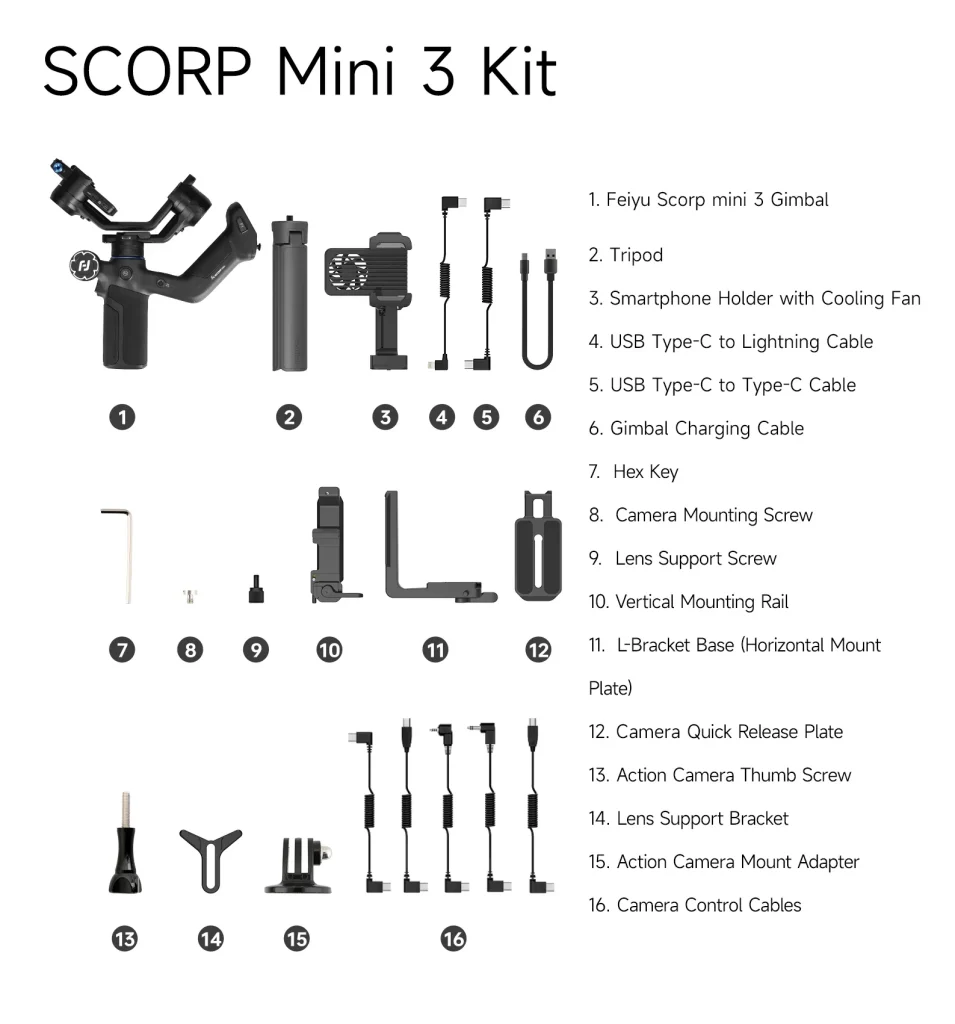
I also appreciated that Feiyu includes a lot of the little extras in the kit: a sturdy zippered carrying case, a GoPro mount, the phone clamp, an extension pole for those crane/jib shots, and even a small LED fill light that can attach to the gimbal. In my kit they sent, all these accessories were present (that’s the “Pro Kit” package which retails for around $299, versus $269 for just the basic gimbal) . The extras aren’t absolutely essential, but the extension rod did come in handy when I wanted to elevate the gimbal on its tripod for a high-angle shot. Considering the package price, it’s nice that you don’t have to buy these bits separately.

Portability
When it’s folded down, the Scorp Mini 3 Pro isn’t pocket-sized, but it’s compact enough to fit in a backpack. The underslung handle folds inwards, making the whole package a bit bulkier than a straight stick design. It’s about the size of a rolled-up magazine (albeit a 1 kg magazine made of metal). I’d say it’s travel-friendly in the sense of packing into a camera bag, but it’s definitely not as convenient as ultra-compact phone-only gimbals. As a travel vlogger, you could carry this on trips, but if you only shoot smartphone footage when traveling, a smaller gimbal like a DJI Osmo Mobile or Insta360 Flow might make more sense for weight and size. The FeiyuTech Scorp Mini 3 Pro is for creators who want to travel relatively light but still bring a mirrorless camera . It’s lighter than lugging a full-size DJI Ronin, yet about 2-3 times heavier than a mini phone gimbal. For me, this trade-off was acceptable because I often carry a mirrorless camera anyway; having one gimbal to serve both my camera and phone actually saved me space versus packing two gimbals.
Performance in the Field
Of course, a gimbal can have all the features in the world, but the proof is in the footage. I took the Scorp Mini 3 Pro out on multiple shoots to see how it performs in real-world conditions.
Stabilization
In a word, excellent. The Scorp Mini 3 Pro’s stabilization is on par with the best I’ve used. Walking or even jogging lightly with it, my camera footage stayed smooth and judder-free . The 3-axis motors (powered by what Feiyu calls a 2025 “Quaternion stabilization algorithm 10.0”) did a great job counteracting my steps and shakes. I did slow tracking shots, whip pans, even a full 360° barrel roll using POV mode – all came out silky. With my mirrorless camera attached, I captured some dynamic B-roll shots: gliding through a crowd, craning up from ground to sky, and orbiting around a subject. The Scorp Mini 3 Pro handled each move without stuttering. I did not detect any oscillations or micro-jitters in the footage, indicating the motors and balance were well tuned. It gave me that “floating camera” feel that good gimbals provide, where the camera almost seems to hover through space.
One stress test I tried was mounting a fairly heavy setup: a full-frame camera with a 24–70mm f/2.8 zoom. This combo was near the gimbal’s weight limit (around ~1.8 kg including the lens). Balancing took a little extra effort – I even had to remove the camera’s eyepiece to avoid it bumping the roll motor, and I balanced it at roughly the midpoint of the lens’s zoom range to account for weight shift when zooming . I half expected the gimbal to struggle with this load, but surprisingly it held it. The motors compensated well as long as I moved relatively smoothly. I didn’t experience any shaking or motor overload with that heavy setup, which speaks to Feiyu’s improved motor strength . Still, I’d recommend staying under the max payload for optimal results – but it’s good to know the Scorp Mini 3 Pro can survive at its limits if needed.
Using the AI Tracker
One of the most fun (and useful) aspects of this gimbal is the AI tracking feature. I tested this in a “talking to camera while moving” scenario. I set the Scorp Mini 3 Pro on its mini tripod about 10 feet away, mounted with my smartphone. With a simple “OK” hand gesture, the gimbal’s little red-eyed AI camera locked onto me and the gimbal began to follow as I moved sideways and back . It’s almost eerie how it turns to keep you centered – like having an invisible cameraperson panning the shot. This was fantastic for recording a piece to camera alone; I could walk and talk and the gimbal smoothly kept me in frame. I will note, by default the AI tended to keep my face dead-center, which often left a bit too much headroom for my liking (too much empty space above my head) . I discovered later that you can retrain the framing by using a “double-L” hand gesture to tell it to lock a new framing offset . Once I learned that trick, I could position myself a bit lower in the frame and lock it in, so the composition looked more professional (rule-of-thirds, etc.). It’s a slight learning curve, but a clever feature. Overall, the tracking performance was reliable; even when I moved somewhat fast or if someone briefly walked between me and the gimbal, it didn’t freak out. The manufacturer claims a range up to 18 m and a wider field of view in this new AI version – I didn’t measure the exact distance, but I had no issue at ~5–6 m distance and moderate lighting.
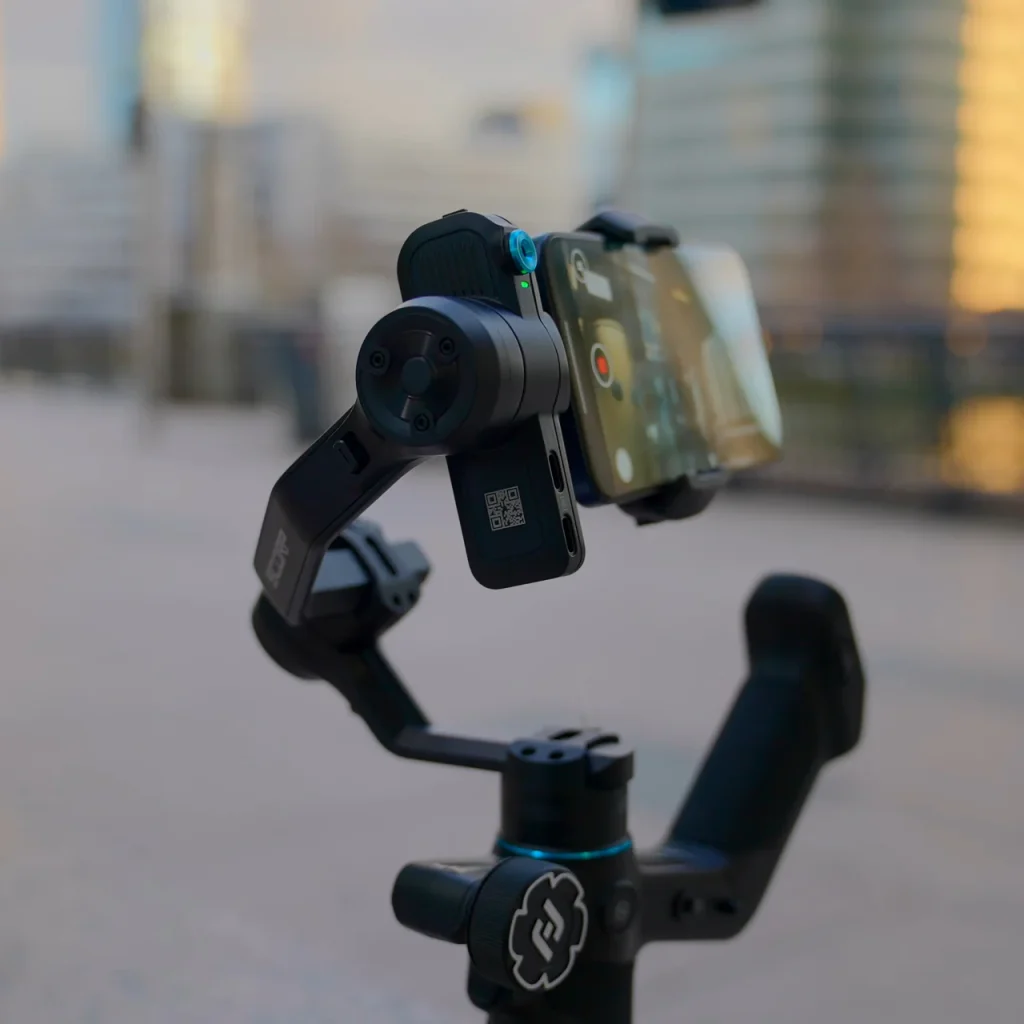
For solo content creators, this AI tracker is a boon – it essentially gives you a robotic cameraman. Competing gimbals often require using your phone’s camera and app for tracking or even buying extra hardware (DJI’s Ronin series, for example, needs a separate transmitter and phone to do ActiveTrack on a mirrorless camera) , so Feiyu’s built-in solution is more convenient.
Controls and shooting experience
In active use, I frequently switched modes depending on the shot. The Scorp Mini 3 Pro offers all the typical gimbal modes: Pan Follow (PF), Pan-Tilt Follow (PTF), All Locked, POV (3-axis follow including roll), and even a selfie mode. Switching modes was extremely quick – I preferred using the dedicated Mode button on the grip which cycles through modes (the little LED icons update to show the current mode) . Alternatively, you can tap the touchscreen and select a mode from the menu, but I found the physical button simpler while filming. The joystick is small but very responsive for subtle adjustments. For instance, while filming a low-angle chase shot of a friend running, I used the joystick to tilt the camera up slightly mid-shot to keep them in frame. The movements are smooth and not jerky, which is exactly what I want from a gimbal joystick.
I also did a few creative shots: one favorite was filming a subject walking backwards up a flight of stairs (I got a really low angle at foot level, using the underslung grip). Even on an incline and me concentrating on not tripping, the gimbal delivered a stable moving shot up the stairs . In another test, I mimicked a “dolly zoom” by walking forward while slowly zooming my lens – the stability held and the move looked great in camera. The Scorp’s ability to do 360° roll shots in POV mode let me capture a dynamic “barrel roll” clip down a hallway, adding a dramatic twist to the footage. Those kinds of shots are hard to do handheld or even on a glidecam, but are easy with a modern gimbal.
Throughout my shoots, I paid attention to any flaws: I didn’t see any random vibrations, and the motors never cut out. The gimbal was quiet except for when the phone cooling fan was on (it’s a gentle whir, barely audible unless in a silent room). Battery life was solid; after roughly 5 hours of intermittent use (lots of on-off), I still had around 30% battery remaining as indicated on the screen. I’d say the 14-hour claim is plausible if the gimbal is just idling or not constantly working under heavy load, but expect less in continuous heavy use. Regardless, it’s plenty for a day’s shooting, and I never felt battery anxiety.
Who Is It For? (And Is It Too Big for Travel?)
The FeiyuTech Scorp Mini 3 Pro carves out an interesting niche. It’s ideal for video content creators who utilize multiple camera types. If you’re a filmmaker or vlogger who wants one gimbal to handle your mirrorless camera on one project, and your smartphone or GoPro on the next, the Scorp Mini 3 Pro was practically made for you. Wedding filmmakers, for example, could use it with a mirrorless camera for the ceremony shots, then pop in a phone for behind-the-scenes social media clips. Indie filmmakers can use it as a lightweight run-and-gun stabilizer for mirrorless rigs, while travel vloggers can mount a phone and let the AI track them for a walking tour segment.
However, if your focus is exclusively travel blogging with a smartphone, you might find the Scorp Mini 3 Pro to be a bit overkill in size. Yes, it lets you “travel light” compared to carrying a full-size 3 kg gimbal, and FeiyuTech even bills it as a good choice for creators on the go . But at ~1 kg, it’s still heavier than a folding phone gimbal that weighs ~400 g or the pocket-sized all-in-one cameras like the DJI Pocket 3. I travel quite a bit, and I would personally take the Scorp Mini 3 Pro on trips where I know I’ll want my mirrorless camera and phone stabilized (it saves me packing two separate gimbals). If I were only going to shoot with my phone for casual travel vlogs, I’d probably opt for a smaller dedicated phone gimbal to save weight. So, it’s all about your shooting style: the Scorp Mini 3 Pro is a fantastic one-gimbal solution for hybrid creators, but pure smartphone shooters who prioritize ultralight gear might find it larger than they need.
Comparison to Other Flagship Gimbals (2025)
No review exists in a vacuum – so how does the Scorp Mini 3 Pro stack up against the other big names and flagship stabilizers of 2025?
Scorp Mini 3 Pro vs. DJI
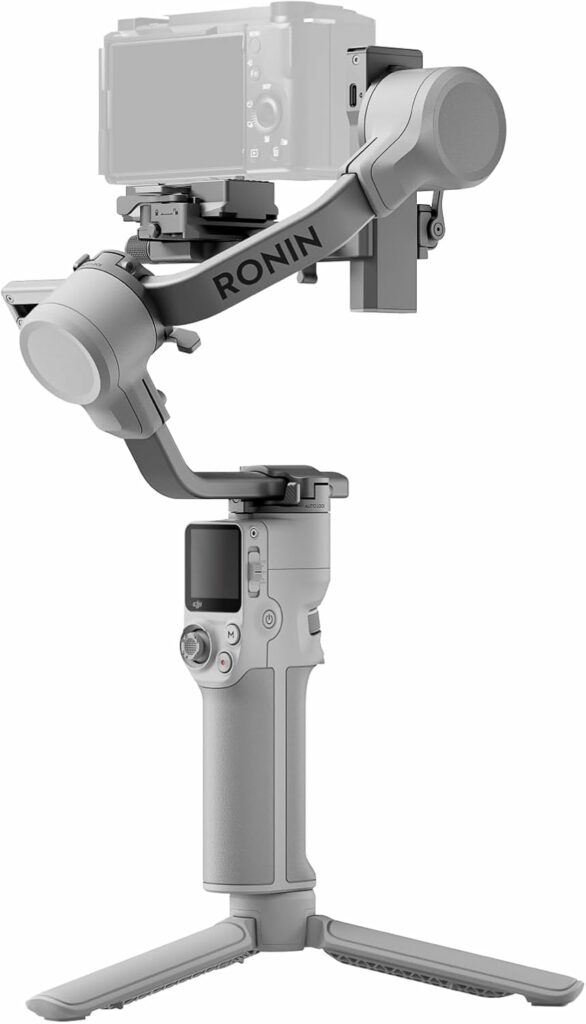
DJI’s Gimbals: DJI is the 800-pound gorilla in the gimbal world, with their Ronin series. The closest competitor to the Scorp Mini 3 Pro from DJI right now is the DJI RS 3 Mini (and presumably an RS 4 Mini if you’re reading this in late 2025). The RS 3 Mini has a similar payload (up to 2 kg) and is slightly lighter in weight, but it lacks any built-in AI tracking camera. DJI’s solution for subject tracking with mirrorless cameras relies on using their Ronin Image Transmitter and the ActiveTrack system via a smartphone app – a setup that’s more cumbersome and costly if you want the self-tracking feature. In terms of price, DJI’s minis tend to be considerably pricier. For example, the RS 3 Mini launched around $369, and the newer RS 4 Mini combo is about $450–$460, whereas the Scorp Mini 3 Pro (with all the extras) is roughly $300 . Feature-to-feature, FeiyuTech is offering a better value for money. The only edge DJI might hold is a slightly more polished software ecosystem and maybe marginally better tracking algorithms (their ActiveTrack is very good) . But from my perspective, unless you specifically need DJI’s ecosystem integration, the Scorp Mini 3 Pro gives you more bang for your buck – you’re not paying the “DJI tax” just for the name . I was genuinely impressed that Feiyu’s gimbal can go toe-to-toe with DJI’s in stabilization performance.
Scorp Mini 3 Pro vs. Zhiyun
Zhiyun’s Gimbals: Zhiyun, another major player, has their compact Crane M3S and the slightly larger Weebill series. The Crane M3S is actually quite comparable: about 700 g in weight, supports full-frame cameras (they demonstrated it with a Sony A7 + small zoom), and even has an integrated LED video light. It’s a strong option if you need a super lightweight rig for mirrorless cameras. However, the Crane M3S lacks any AI tracking feature – it’s purely a stabilizer without the self-tracking smarts. Also, its payload, while good, is around 1.2–1.5 kg effectively, meaning it might struggle with larger lenses. The Scorp Mini 3 Pro can handle a bit more payload (2 kg) and has that unique tracking ability built-in. On the other hand, Zhiyun’s build quality and ergonomics are proven, and some prefer their balancing system. It really comes down to whether you value the AI tracking and extra features of the Scorp. For a mirrorless-only user who doesn’t care about phone shooting or AI tricks, the Crane M3S is an alternative to consider. Meanwhile, Zhiyun’s Weebill 3/3S or new Weebill 4 are larger gimbals aimed at heavier payloads (and they weigh more than 1 kg themselves). Those might be overkill if you don’t need to fly a big camera. The Scorp Mini 3 Pro slots in below those – more towards portability and hybrid use.
Scorp Mini 3 Pro vs. Hohem
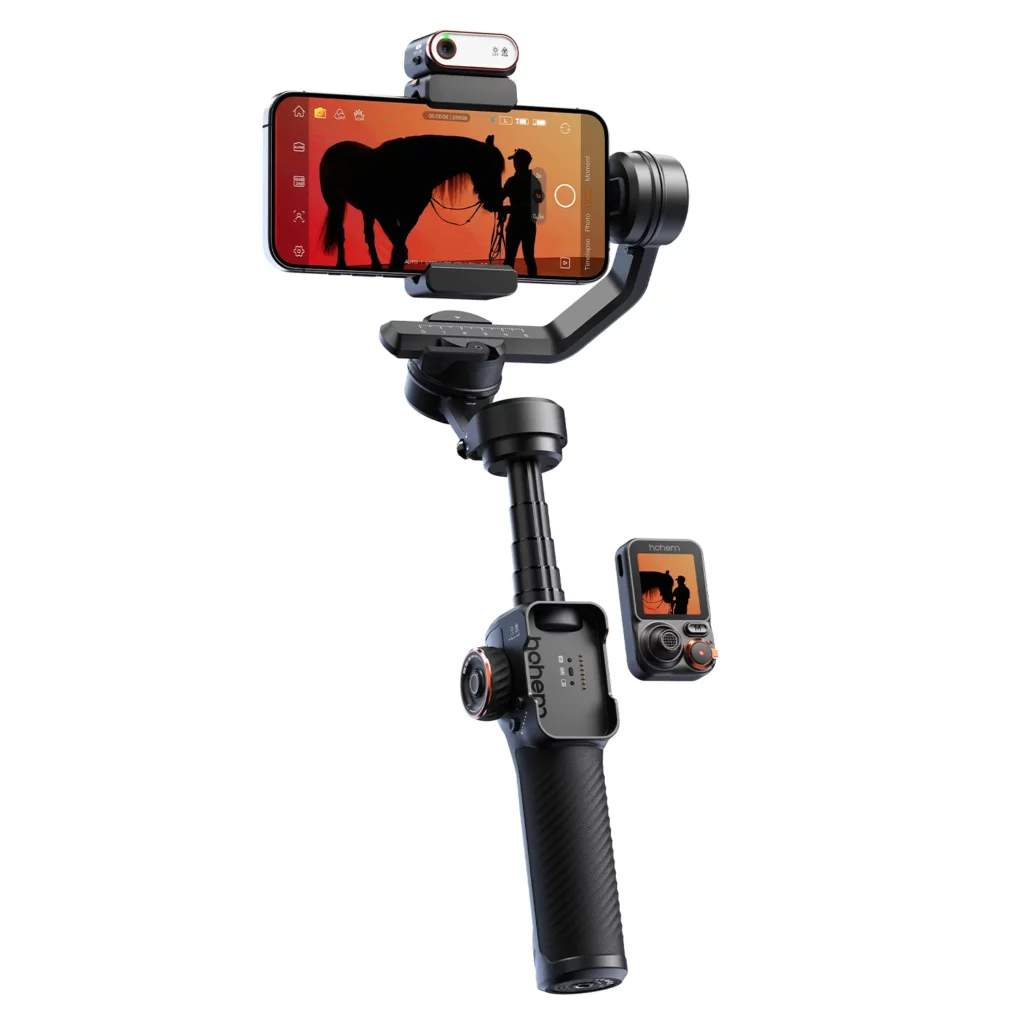
Hohem iSteady M6/M7: In the arena of “AI tracking gimbals,” Hohem has been an innovator. The Hohem iSteady M7 (2025) is a smartphone gimbal that also includes an AI tracking sensor (in fact, Hohem pioneered magnetic add-on AI modules in earlier models). I’ve used the iSteady M6 before, and it was impressive for phones. The Scorp Mini 3 Pro, however, kind of one-ups the Hohem by extending support to heavier cameras. In terms of price and functionality, Hohem’s iSteady M7 is a close match for phone-centric users – both it and the Scorp have AI tracking and a control wheel for focus/zoom . One nifty trick Hohem did was allow their AI tracker’s feed to display on an external little monitor on the gimbal, so you can track yourself while using a camera’s high-quality rear camera (instead of being forced to use the front camera for seeing yourself). But the Hohem M7 is really only for smartphones, it can’t carry a mirrorless camera. Both cost around the same ($250–300 range), so for anyone wanting a do-it-all device, the FeiyuTech’s broader compatibility gives it an edge in my book. The Hohem might be slightly more compact and a tad lighter, since it’s built for phones primarily.
Scorp Mini 3 Pro vs. FeiyuTech
FeiyuTech’s Own Lineup: It’s worth noting where the Scorp Mini 3 Pro sits in Feiyu’s product line. If you find 2 kg payload still isn’t enough (maybe you’re using a bigger DSLR or cinema camera), Feiyu offers the larger Scorp 3 (and Scorp 2 before it) which can handle heavier setups up to 2.5 kg and beyond . The Scorp 3 is closer in size to a full-size gimbal (and costs more, around $400+). Interestingly, one experienced user mentioned that the Scorp 3 isn’t much larger physically than this Mini 3 Pro, just with beefier motors . So if you eventually outgrow the Mini’s capacity, there is an upgrade path without leaving Feiyu. But for most mirrorless camera owners, 2 kg is plenty. Compared to the previous Scorp Mini 2, this new Mini 3 Pro has a higher payload (4.4 lbs vs 2.7 lbs on Mini 2) and much better tracking (AI 4.0 vs older AI 2.0) . I also noticed significantly improved battery life and some design tweaks (the detachable handle with remote function is new). So if you’re wondering about upgrading from the Scorp Mini 2, the jump in capabilities is quite substantial .
In summary, the Scorp Mini 3 Pro holds its own against the 2025 competition. It undercuts DJI on price while offering comparable stabilization quality and easier tracking functionality. It offers features and a payload range that a lot of smaller gimbals (Zhiyun, Hohem, etc.) can’t match. Unless you have an allegiance to another brand’s ecosystem or you truly need the ultra-lightest option, the Scorp Mini 3 Pro is a top contender in the mid-sized gimbal category this year.
Conclusion
After several projects with the FeiyuTech Scorp Mini 3 Pro, I can confidently say I’m impressed. This gimbal has proven to be a reliable creative tool that let me capture a variety of shots effortlessly – from smooth cinematic pans and tilts to dynamic low-angle moves and even self-tracking vlog clips.
No product is perfect, so what are the downsides? For one, as mentioned, if you’re a casual traveler who mostly shoots on a phone, this gimbal might feel a bit bulky. A 1 kg rig plus the weight of a phone or camera is a commitment, whereas smaller phone gimbals or all-in-one cameras offer more grab-and-go convenience. Also, while the AI tracking is awesome, it’s not 100% foolproof – occasionally I had to stop and reframe if I wanted a specific composition (until I learned the advanced gestures). And if you’re often swapping very different setups (say a big camera rig then a tiny phone), expect to rebalance each time – that’s normal, but worth noting in a multi-use gimbal like this.
However, those feel like reasonable trade-offs for what you’re getting. The pros far outweigh the cons in my experience. To summarize my key takeaways about the FeiyuTech Scorp Mini 3 Pro:
- Versatility: It truly lives up to being a “universal” gimbal – handling different device types without compromising stability. This one device replaced two gimbals in my bag.
- Stabilization Performance: Rock-steady footage, even in challenging conditions. It performs at a flagship level for smoothing out video, comparable to bigger gimbals.
- Innovative Features: The built-in AI tracking and cooling fan for phones set the Scorp Mini 3 Pro apart. These features aren’t just gimmicks; they genuinely improved my solo shooting capabilities and protected my phone during long takes .
- Build and Handling: Solid construction with ergonomic design (detachable handle, control wheel, OLED screen). Apart from a minor handle clearance quirk , the user experience was excellent. It’s evident FeiyuTech listened to feedback from earlier models.
- Value: At around $269–299, it’s competitively priced. You’re getting a lot of high-end functionality for the money. In a world where DJI and Zhiyun often charge a premium, FeiyuTech delivered a flagship-capable gimbal at a mid-range price point .
Ultimately, the Scorp Mini 3 Pro feels like a tool designed for modern content creators. It’s flexible, feature-packed, and simplifies the workflow for people who shoot alone or on diverse devices. It has certainly earned a spot as my go-to gimbal for upcoming projects – I can trust it with my mirrorless camera for professional work, and then use it with my phone when I’m just out capturing travel footage for fun. If that sounds like your use case as well, I highly recommend giving the Scorp Mini 3 Pro a try. It just might become the one gimbal that unifies all your camera gear into a single, smooth storytelling machine.
Official Product Page: FeiyuTech SCORP Mini 3 Pro
Check out the FeiyuTech SCORP Mini 3 Pro on Amazon
Related Links
DJI RS 4 Review: The Mid-Tier Sweet Spot for Mirrorless Creators
FeiyuTech Scorp 2 Review: AI-Smart Muscle on a Budget
FeiyuTech SCORP Mini 3 Pro — Frequently Asked Questions
What devices does the SCORP Mini 3 Pro support?
It’s a universal 3-axis gimbal for mirrorless/APS-C and compact cameras (up to ~2 kg), plus smartphones and action cameras using the included adapters.
What’s included in the Pro Kit?
The Pro Kit typically adds an extension pole, magnetic/clip-on fill light, carry case, and an expanded cable set on top of the base gimbal, mini tripod, phone clamp, and GoPro mount.
How heavy a camera can it carry?
The rated payload is up to 2 kg (4.4 lb). For best results, stay a little under the limit and ensure precise balance, especially with long zooms.
Does the AI tracking work without a phone?
Yes. The gimbal’s built-in AI module tracks faces/subjects standalone. You can start/stop tracking with gestures and re-frame using advanced gestures when needed.
What gestures does the AI support?
Common gestures include an “OK” sign to start tracking, an open palm to stop, and a double-L frame gesture to shift composition. (Exact mappings can vary by firmware.)
Is there a cooling solution for phones?
Yes. The phone clamp has an integrated cooling fan to reduce thermal throttling during long 4K shoots in warm conditions.
How long does the battery last? Is charging fast?
FeiyuTech quotes up to ~14 hours in light use. Real-world mixed shooting is typically shorter. It charges via USB-C and supports fast charging.
Do I need to rebalance when switching devices?
Usually yes. Swapping between a mirrorless setup and a phone/action cam changes the center of gravity. Use the quick-release plate and axis markers to speed up re-balancing.
What’s the detachable underslung handle for?
It improves low-angle control and can detach as a wireless remote with its own joystick and OLED—useful when the gimbal is on a tripod.
Is it too big for travel vloggers?
It’s around ~1 kg, so heavier than phone-only gimbals, but far lighter than full-size rigs. If you shoot both mirrorless and phone, it replaces two gimbals in one bag.
How does it compare to DJI/Zhiyun minis?
Versus DJI RS/RS Mini and Zhiyun Crane M-series, the Mini 3 Pro competes on stabilization and often undercuts on price, while adding built-in AI tracking and a phone cooling clamp.
Any tips for heavy lenses or zooms?
Balance at mid-zoom, remove eyecups if they contact the roll arm, and consider the extension plate if needed. Keep total payload comfortably under 2 kg.
Does it have an app and firmware updates?
Yes. Use Feiyu’s mobile app for advanced modes and settings, and update firmware to get the latest tracking gestures and stability improvements.
What are the main downsides?
Size/weight compared to phone-only gimbals; rebalance when switching device types; and occasional AI framing tweaks needed (solvable with gestures).
