
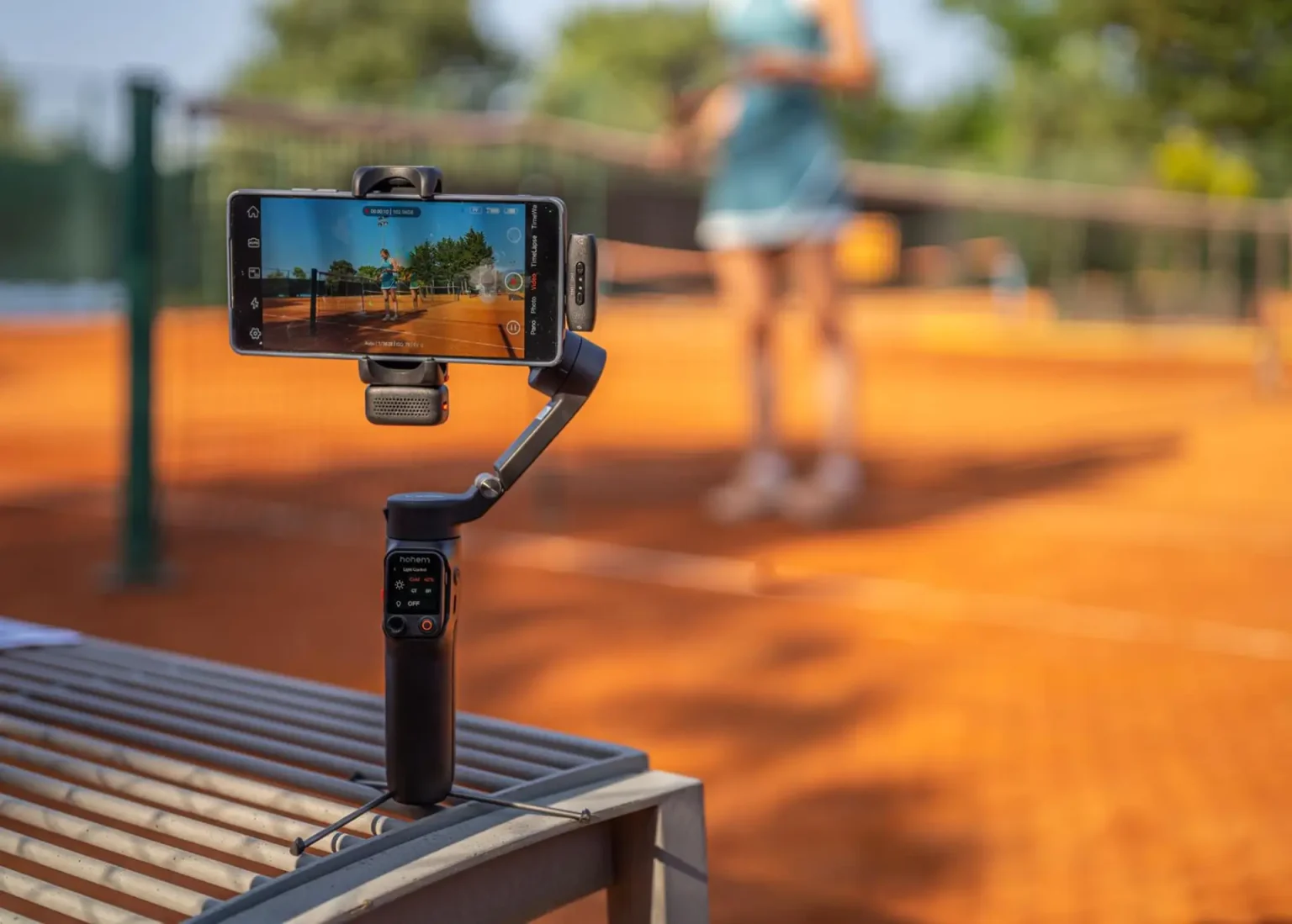
I’ve been testing this new smartphone gimbal for the past couple of weeks after Hohem sent me a unit to review. Here is my Hohem iSteady V3 Ultra review. As someone who frequently vlogs during travels, I was eager to see how this foldable, AI-tracking gimbal could up my mobile video game. I tried it with both an iPhone (a 13 Pro in my case) and an Android phone (Samsung Galaxy), to get a sense of its cross-platform performance. Spoiler alert: the V3 Ultra packs impressive features for solo content creators, with only a few minor quirks. Here’s my in-depth, first-person take on using the iSteady V3 Ultra in real-world travel and vlogging scenarios.
First Impressions and Setup
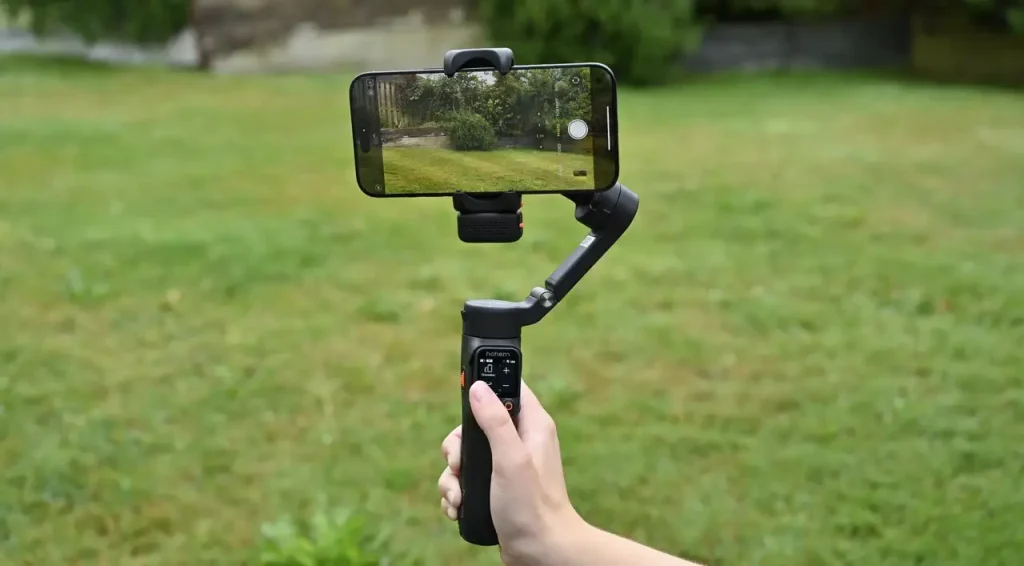
Right out of the box, the Hohem iSteady V3 Ultra feels solid yet reasonably lightweight – about 420 grams on its own (roughly just under a pound, so it’s not going to break your wrist). The build quality surprised me in a good way; Hohem went with a matte finish on this model, which not only looks sleek but also hides fingerprints better than the glossy plastic of some earlier Hohem gimbals . The grip is ergonomically curved and comfortable to hold. I have average-sized hands, and the handle’s oval shape fit nicely. Even when my friend with larger hands tried it, the controls were still accessible for him it seems ambidextrous design was considered.
Portability: When folded, the V3 Ultra becomes quite compact – I was actually able to slip it into my jacket pocket when heading out, and it fits easily in a backpack’s side pocket . For travel bloggers, that fold-and-snap design is a huge plus. All three axes have locking latches, so you can tuck the gimbal away without the arms flopping around. The locks click firmly in place, which gave me confidence that the gimbal wouldn’t unfold itself in my bag.
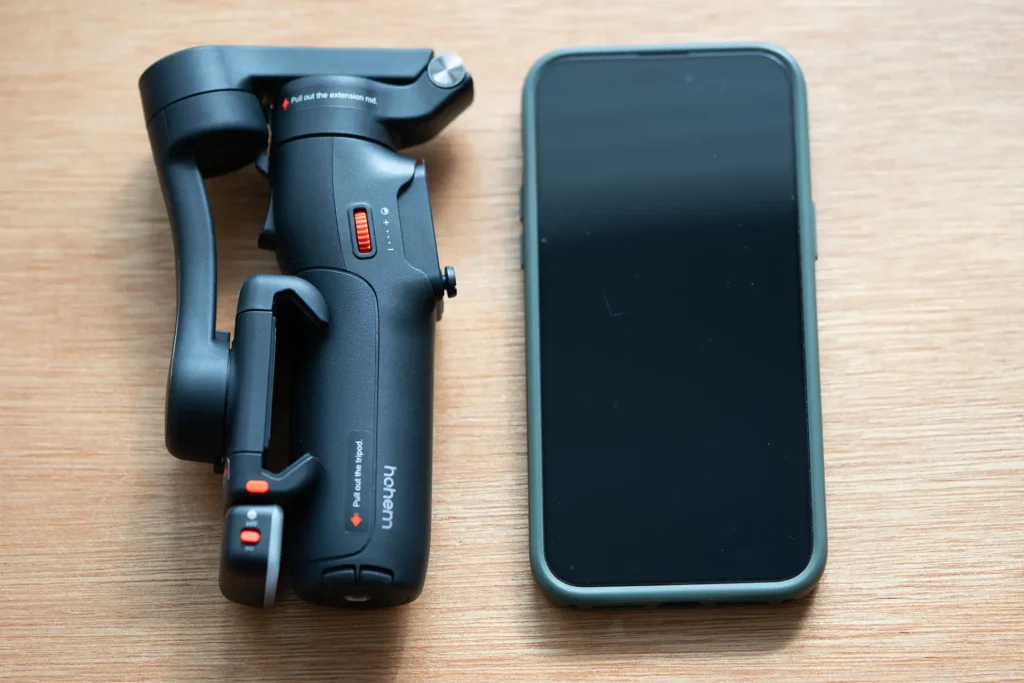
Setting up the V3 Ultra was straightforward. Hohem supplies a removable phone clamp (non-magnetic, you physically squeeze it onto your phone) that handled both my iPhone 13 Pro and a large Android phablet without issue. It can accommodate thick phones (up to ~12.5mm) and widths from about 58mm to 98mm, so even big phones with a case will fit . I attached my phone, roughly centered it, and held the power button for a couple of seconds. The gimbal powered on and automatically calibrated itself. In fact, balancing didn’t require much fiddling – I just made sure the phone was roughly upright, and the iSteady’s motors leveled it out within seconds. If you’re new to gimbals, you’ll be happy to know there’s no complex tuning needed before you start shooting; I was up and running almost immediately.
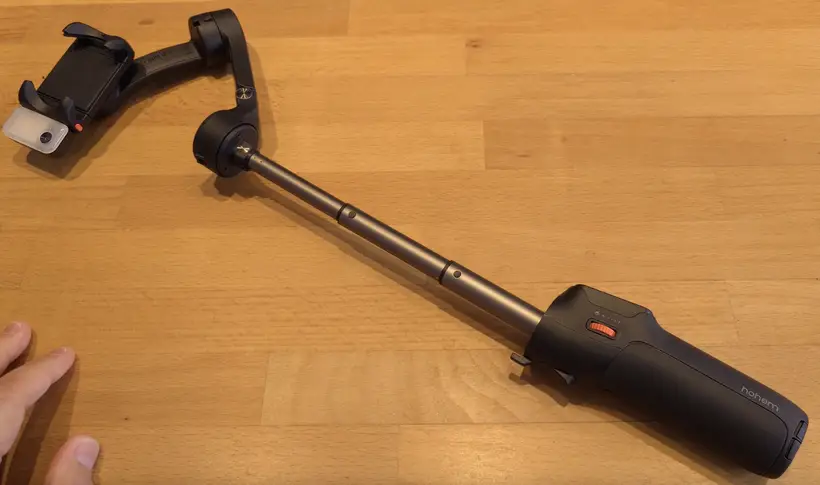
One of the immediate standout features I noticed was the built-in extension rod hiding in the handle. It telescopes out about 20.5 cm (8 inches) from the grip . This was an instant win for me as a vlogger – I could pull the handle out to get wider selfie shots and fit more background into the frame without carrying a separate selfie stick . The extension rod slides out smoothly and feels sturdy when extended. Hohem does warn that after a lot of use the base of the rod (which doubles as the pan motor axis) might loosen, but they thoughtfully included a small hex key so you can tighten it if needed . In my tests, I didn’t experience any loosening, but it’s good to know maintenance is easy.
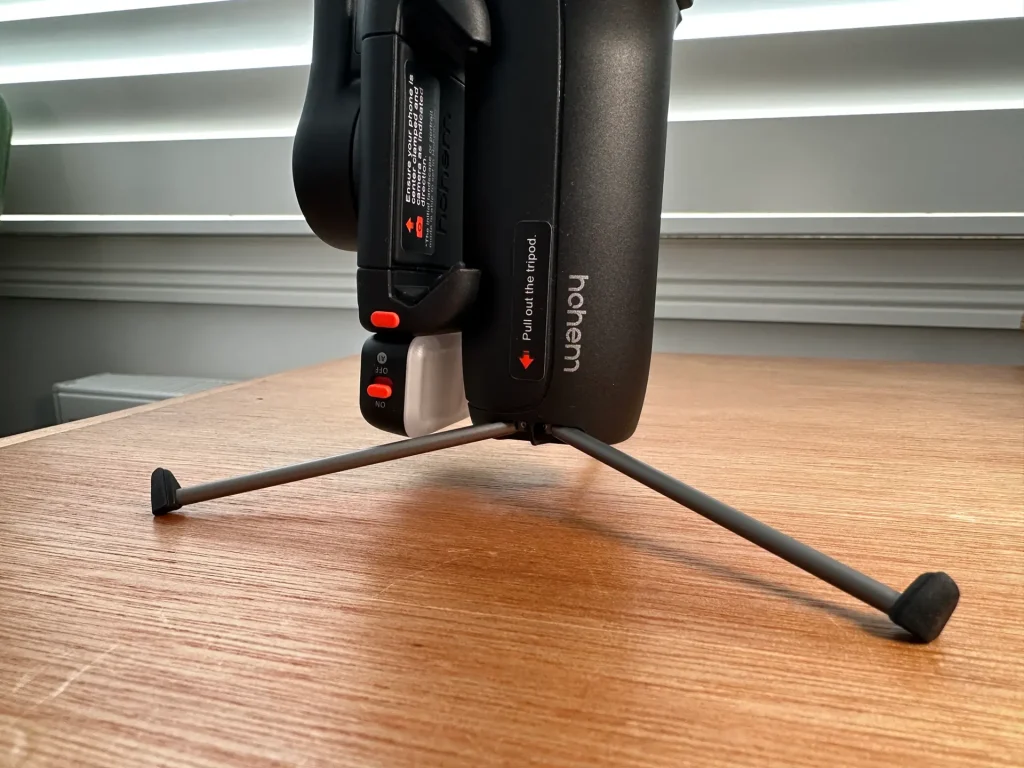
Also built into the base of the handle are small tripod legs – you pull them outwards and the gimbal stands on its own tripod. This came in handy countless times: I could set the gimbal down on a table or the ground to film a static shot or timelapse, or to use the remote tracking while I stepped into frame. The mini tripod is metal and fairly rigid , though because of their slim size, I found it stable on flat surfaces but a bit wobbly on very uneven ground (more on that later). Still, having a tripod integrated means I didn’t need to pack an extra accessory.
Before diving into shooting, I did install the Hohem Joy smartphone app (available on iOS and Android) to update the firmware and explore features. The app connected via Bluetooth quickly, and I appreciated that after initial setup, the gimbal and its AI tracker can operate largely without needing the app active. This is great because it means less hassle – you can use your phone’s native camera or other apps while still benefiting from the gimbal’s stabilization and tracking.
Design and Build Quality
The Hohem V3 Ultra’s design builds on the company’s earlier models, with thoughtful improvements. As mentioned, the finish is matte and the handle is more contoured than the older iSteady V2’s boxier grip . After long shooting sessions, I found the V3 Ultra comfortable to hold; I didn’t experience hand cramps or slippery feel, even under the hot sun (sweaty hands). The device weighs ~420g, which strikes a balance – it’s light enough for travel and extended use, yet has enough heft to feel stable and well-built. For context, it’s a tad heavier than DJI’s latest Osmo Mobile 7 (~368g) and the Insta360 Flow 2 Pro (~357g) but still very much in the portable category.
Build quality is excellent for the price range. The motors and arms feel robust. I tested the gimbal with an iPhone 13 Pro and later an iPhone 14 Pro Max with a Moment lens attached (~300g total payload), and the V3 Ultra handled it fine . There was a slight flex in one of the arms if I really jostled it with that heavier setup, but during normal use it wasn’t noticeable. (Hohem rates the max payload up to around 400g, so it can even support the heaviest smartphones and small add-on lenses without complaint .) All three axes have locking switches, making it easy to secure for transport – these locks click confidently into place and feel less flimsy than some older gimbals I’ve tried.
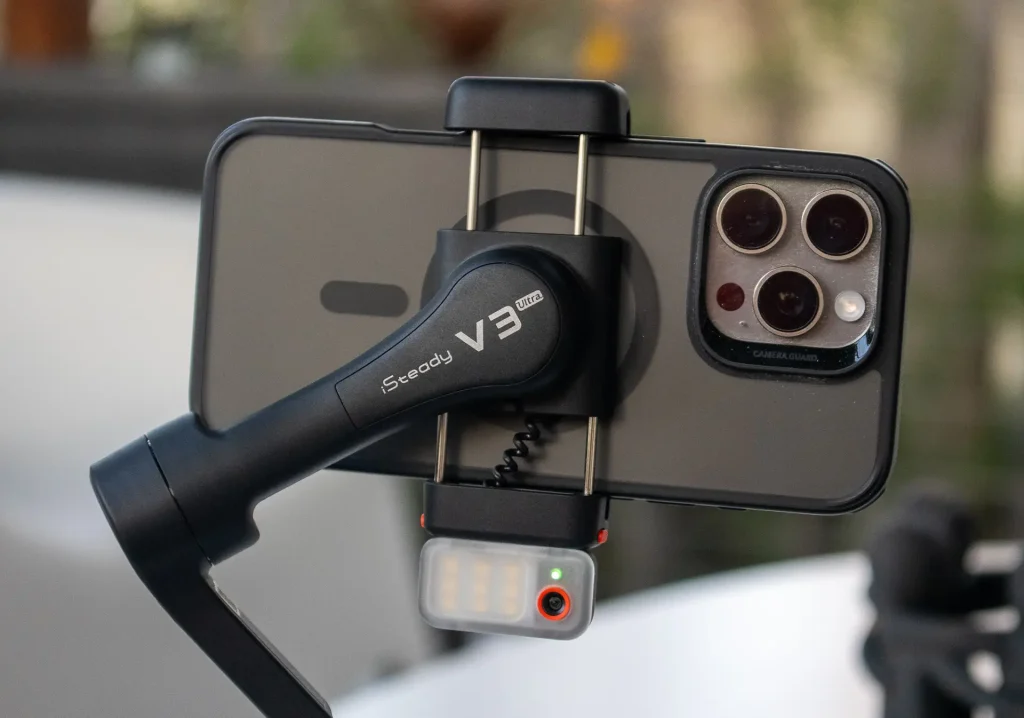
The magnetic AI tracking module is a unique aspect of the V3 Ultra’s design. It’s a small rectangular attachment that snaps onto the top of the phone clamp magnetically. Hohem added a little safety latch you can engage once it’s attached, to prevent the tracker from accidentally popping off if you bump it – a smart tweak, since the previous gen V2’s tracker was integrated and didn’t have this concern . The module itself is tiny (weighs only ~14g) , so it doesn’t add bulk. I love that you can remove it when you’re not using tracking to save a bit of weight and power, or if you just want to use the gimbal as a plain stabilizer.
One thing to note: unlike some competitor gimbals (e.g., DJI OM series or Insta360 Flow) that use a quick-release magnetic phone mount, the Hohem uses a traditional clamp built into the arm. That means you do have to slide your phone in and out rather than snapping it on magnetically each time. This is mostly a matter of preference – I personally don’t mind the clamp, as it feels secure and I’m used to it, but some users who swap phones frequently might wish for a magnetic mount. Hohem’s choice here keeps the design simpler (one less piece to carry) at the expense of a tiny bit of convenience .
Overall, the V3 Ultra feels like a refined piece of kit. It survived being tossed in my backpack and even a few accidental knocks without any issues. The only part that felt slightly delicate are the tripod legs because they’re thin – I wouldn’t put heavy pressure on them sideways – but they are metal, so they should hold up in normal use. Hohem clearly put thought into durability and ergonomics for this travel-oriented model.
Controls and Touchscreen Remote
The Hohem iSteady V3 Ultra has the usual physical controls on its body: a small joystick for manual panning/tilting, a couple of buttons (power, shutter, mode switch), and a trigger around the back for things like re-centering or activating sports mode. What really sets it apart, though, is the detachable wireless remote control that doubles as the gimbal’s built-in display.
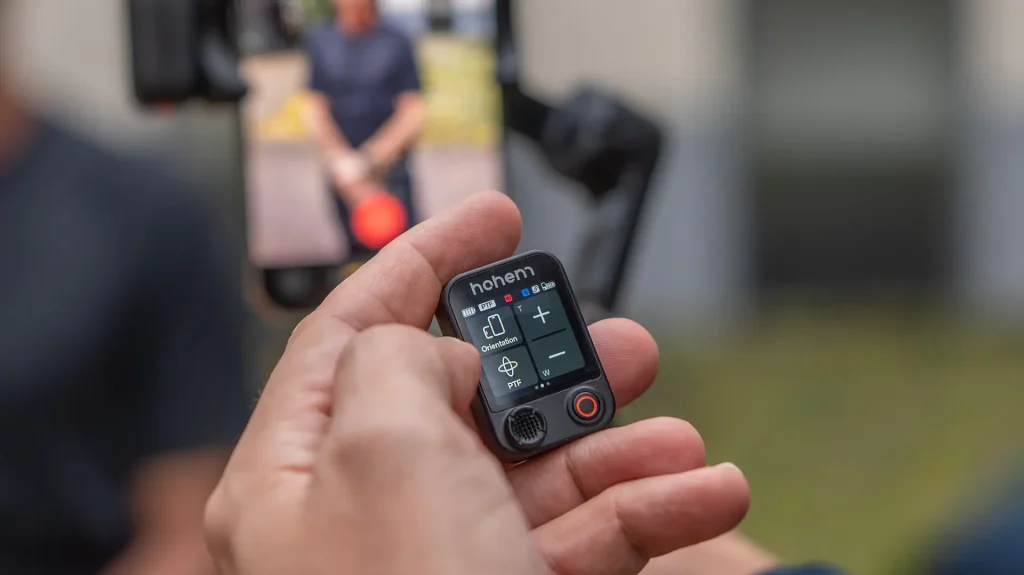
Docked at the front of the handle, the remote’s 1.22‑inch color touchscreen doubles as a status screen and menu controller. It’s bright and easy to read, so I could quickly confirm the current mode or whether face tracking was active without looking at my phone. From this little screen I navigated settings, switched modes and toggled the AI tracker on or off, saving the hassle of opening the app or guessing which mode I was in.
The remote pops out with a gentle push and becomes a Bluetooth controller you can hold or hand to someone else. It has a wireless range of about 10 meters and streams a live view from the AI camera onto its tiny screen. In my testing, I put the gimbal across the room, stood 15 to 20 feet away and still could pan the gimbal, start recording and select myself as the tracking target all from the remote.
The joystick and buttons on the remote mirror the gimbal’s controls. It also has a “Scenario” menu offering pre‑programmed creative moves like automated panoramas, timelapses and rolling shots. I used it to set up a 30‑minute auto‑pan timelapse of a sunset, and the resulting clip had beautifully smooth motion without me babysitting the camera.
The remote uses its own 140 mAh battery. In my use it lasted several hours and recharged when docked in the gimbal. This convenience and freedom made me wish every gimbal came with such a handy little controller.
AI Tracking Performance
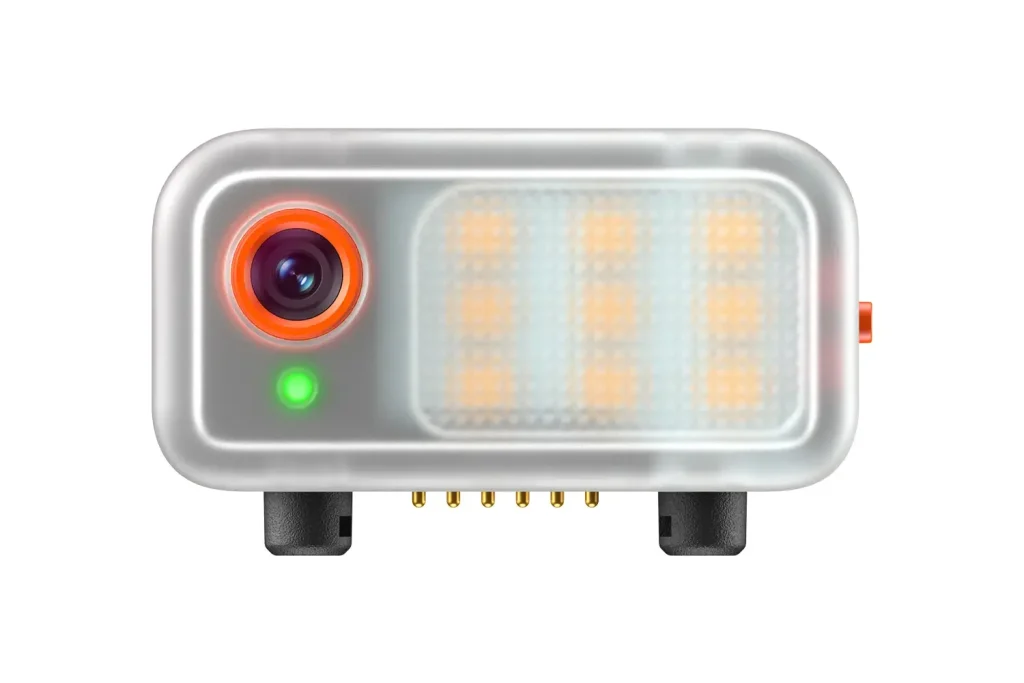
The V3 Ultra’s magnetic AI module holds a little 2 MP camera and dedicated AI chip, so it handles all the tracking itself. Because it isn’t relying on your phone’s camera or app, it works system‑wide. I could hop between the iPhone’s camera, Instagram and even a Zoom call, and the gimbal kept me in frame without needing any special software.
This independence also means the tracker follows you through a full 360 degrees. I could walk in a circle, or even jog around the tripod, and the phone smoothly panned to stay pointed at me. The unrestricted pan is great for walking‑and‑talking shots or capturing yourself moving around a workspace.
Hohem’s newest algorithm improves tracking speed and flexibility. When I stepped out of frame and back in, it reacquired me in less than a second, and it tracked my dog darting across the lawn just as easily. You can even adjust the framing with the joystick or remote and the AI keeps you off‑centre, which helps when you want a more cinematic composition.
Starting and stopping tracking is simple, too. Raise an open palm to start, or make a peace sign to change the target or stop – I found these gestures worked reliably from several metres away. One note: don’t turn on both the app‑based face tracking and the hardware tracker at once, because they’ll fight for control. On its own, the AI module made solo filming fun and stress‑free, since I could trust it to follow me wherever I moved.
Stabilization Performance and Shooting Modes
Of course, a gimbal’s core job is to stabilize your footage. The iSteady V3 Ultra, as a 3-axis stabilizer (pan, tilt, and roll), performs on par with other top smartphone gimbals in this regard. Simply put, my footage came out very smooth even when I was moving around a lot. Walking shots had that floaty, gliding look – the usual bob from steps was greatly reduced. I did a test walking at a normal pace filming in 4K 60fps, and the result looked almost like a professional steadycam shot, even when I digitally zoomed in a bit to ~3x . The stabilization algorithm (Hohem calls it iSteady 9.0 anti-shake) seems well-tuned.
When I stepped up the intensity to a jog/trot, the V3 Ultra still kept the footage quite stable. There was a hint of residual vertical motion (inevitable unless you use perfect ninja-walk technique), but it was less than I expected – noticeably reduced compared to some earlier gimbals like the Hohem V2 or Zhiyun Smooth Q4 that I’ve used . In practical terms, I’d feel confident using this gimbal for casual running shots or fast action B-roll. To push it further, I enabled the dedicated Sport Mode on the gimbal, which increases the motors’ responsiveness and stiffness. In Sport Mode, I was able to capture cycling footage (I mounted the gimbal on a bike handle briefly) and quick pans without the horizon lagging – the trade-off is you get a bit more micro-jitter, but that’s normal. It’s great that Hohem included a high-torque mode for those action moments .
The iSteady V3 Ultra offers five shooting modes which you can toggle through using the mode button or the remote’s menu. These modes include:
- Pan Follow (PF): the default, where the gimbal smoothly pans to follow your turn, but locks tilt and roll, keeping the horizon level for nice steady moves.
- Pan & Tilt Follow (PTF): follows both your pan and tilt movements (up/down tilting your hand will tilt the phone). This is useful for, say, smoothly tilting up to capture a tall building.
- Point-of-View (POV): or “Follow All” mode – this frees all axes (pan, tilt, and roll) to follow your hand movements, giving a FPV-like immersive feel (the camera will roll a bit into turns, etc.).
- All Lock (Lock Mode): locks all axes so the camera points one direction no matter how you move the handle. Great for when you want a very consistent framing (like sliding the camera along a railing, etc., without it drifting).
- Sport Mode: a trigger-activated mode (hold trigger with a button) that aggressively follows fast motion. As mentioned, it’s ideal for quick action – the gimbal prioritizes keeping up, at the cost of not smoothing out tiny vibrations as much .
I found myself mostly using Pan Follow for general filming, Lock mode for doing intentional strafe shots, and occasionally POV for more dynamic movement shots. Switching modes is easy via the button or touchscreen, and an icon on the screen tells you which mode you’re in.
Low-angle shots: One limitation I noticed is the tilt axis range – the V3 Ultra can’t tilt straight up or straight down as far as some larger gimbals. The tilt range is listed as about -35° to +45° from horizontal. In practice, if I wanted a super low-to-the-ground shot (with the camera looking forward while the gimbal is inverted or near the ground), I had to use the extension rod or just hand-hold the tripod base to get the angle, since the arm’s tilt would max out. It’s not a deal-breaker – I still achieved the shots, just with a bit of manual workaround. For 95% of typical scenarios (including selfie mode, high-angle, and most low-angle needs) the tilt range is sufficient, but extreme angles might need creative handling. The extension rod’s hinge actually gives a little more downward angle when partially extended, which helps for low shots .
Overall, the stabilization and control the V3 Ultra provides left me impressed and confident in shooting. There were no random jitters or shudders (which I’ve seen in some cheap gimbals when they struggle with weight; none of that here). The motors compensated well even when I attached a lens to my phone – I didn’t experience any oscillation or overload. Hohem’s stabilization tech is on par with the big brands, and combined with the tracking, it allowed me to capture footage that would be very hard to do with just handheld phone or even a simple selfie stick.
Fill Light for Low-Light Filming
A fun bonus on the iSteady V3 Ultra is the built-in fill light that’s part of the AI tracking module. Surrounding the little camera eye are LEDs that can illuminate your subject (usually, your face) when filming in dim conditions. As a travel vlogger often filming dinners, sunsets, etc., I found this feature quite handy.
The fill light has three color temperature settings: cool (~6500K), neutral (~5000K), and warm (~2700K) . You can toggle through them and adjust brightness in steps via the remote or the app. In practical terms, it’s enough to brighten up your face from about an arm’s length away in a dark scene. I used it while recording a vlog entry in a night market; it gently lit my face so I wasn’t just a silhouette against the bright market lights behind me. It’s not going to replace a dedicated video light or eliminate harsh shadows beyond a few feet, but as a built-in convenience for some fill on faces, it works well.
I like that Hohem included this because it saves me from mounting an external LED panel or relying on my phone’s front flash (which is usually too harsh or not usable in video mode). A note of caution: using the fill light will draw extra power. In my tests, running it at max brightness did noticeably reduce the total battery runtime of the gimbal. Hohem’s documentation says using the LED at full blast can shave off around 20% of your battery life . I rarely needed it on full power, though – even at half power it gave a nice catchlight and fill on my face. And since it’s easy to toggle on/off, I only used it when necessary.
Battery Life and Charging
Hohem claims a generous 13 hours of battery life on the iSteady V3 Ultra under ideal conditions . Real-world usage will depend on how much you’re using power-hungry features like the AI tracking and fill light. In my mixed usage, I found the battery life to be quite solid. On a day of casual filming – mostly walking shots with some tracking, a few uses of the light and remote – I got roughly 9 to 10 hours before the gimbal needed a recharge . This aligns well with what others have reported (Hohem themselves note ~9 hours with normal use) . Essentially, it can last you a full day of on-and-off shooting, which for travel is great.
If you really push it – say you’re doing a lot of active tracking, plus using the fill light at high brightness continuously – expect the battery to drain faster. In one test, I left the gimbal tracking a moving subject with the light on full, and it lasted around 4 to 5 hours . That’s kind of the worst-case scenario, and even 4-5 hours straight of shooting is more than I personally ever do in one go. For ordinary use, I never had the gimbal die mid-shoot.
Charging is via a USB-C port on the side. It supports fast charging (I used a 20W PD wall charger), and I was able to get about 80% charge in under an hour . A full charge from empty took around 2 to 2.5 hours for me. Conveniently, you can also use a power bank to top it up on the go; I did this once during a long hike, plugging the gimbal into my battery pack during a lunch break. After 30 minutes I had plenty of juice to continue. The fact that it’s USB-C is a relief (no proprietary chargers), since I could use the same cable I carry for my phone and other devices.
One small thing: the battery is not removable, so you can’t swap in a spare – not that most gimbals allow that anyway. But given the all-day capacity, this wasn’t an issue. I’d finish each day with some charge left and just recharge it overnight. For travel use, the V3 Ultra’s battery life gets a thumbs up – it kept up with my daily shooting schedule without making me constantly watch the battery meter.
What Could Be Better
No product is perfect, and the Hohem V3 Ultra has a few quirks and limitations worth noting. None of these were deal-breakers for me, but they’re points to consider:
- Tripod stability on rough surfaces: The built-in tripod legs are super convenient, but they are small. When fully extended, they can feel a little wobbly on uneven ground – I found myself keeping a hand near the gimbal if I had it perched somewhere not perfectly flat, just in case . On a level floor or table it’s fine, but I wouldn’t trust it alone on, say, a rocky surface in heavy wind.
- Tilt range for low angles: As mentioned earlier, the tilt axis doesn’t have the extreme range that some larger gimbals do. Doing very low-to-the-ground or high-angle shots sometimes required me to manually adjust how I was holding the gimbal (or use the extension rod creatively).
- Learning curve for beginners: While I found the V3 Ultra pretty intuitive (especially having used gimbals before), if it’s your first ever gimbal, it can feel a bit overwhelming at first. There’s the app, the remote, the gestures, the modes… It’s a lot of functionality. The good news is you can just stick to the basics and it’ll work great – but expect to spend some time practicing.
- Motor noise in audio: One issue I personally encountered was a faint motor hum being picked up by my phone’s internal microphone during very quiet scenes. If I recorded video using the phone’s mic in a silent room, I later could hear a slight whir from the gimbal motors in the background of the footage . It’s a quiet noise, but it exists. This isn’t unique to Hohem – I tested and found similar noise with another brand’s gimbal – it’s likely the phone’s sensitive mic picking up vibrations through the clamp. In normal ambient sound (outdoor, etc.) you may not notice it, but for important projects I’d recommend using an external mic to avoid this.
- No quick-release phone mount: This is minor, but worth noting. As mentioned, the V3 Ultra uses a standard clamp rather than a magnetic quick-release. It means mounting your phone takes a few extra seconds and two hands. I was okay with this, since the clamp is secure and I didn’t swap phones often. But if you’re used to snapping your phone on/off quickly (like on DJI gimbals), you might miss that convenience .
None of these drawbacks outweighed the benefits for me, but in the spirit of a thorough review, it’s good to be aware of them. Now, how does the V3 Ultra compare to its predecessors and rivals?
Comparison to Other Budget Friendly Gimbals
It’s clear Hohem aimed to set a new benchmark for budget-friendly AI gimbals with the V3 Ultra. As one review summed up: “the extension rod reaches farther and the fill light brightens faces without extra gear”, making the iSteady V3 the best budget AI gimbal you can buy in 2025. I have to agree, at its price point, Hohem is offering a feature set that undercuts many competitors.
Speaking of competitors, how does it fare? The main rivals in 2025 for a smartphone gimbal with these features are probably the DJI Osmo Mobile 7 (or 7 Pro) and the Insta360 Flow 2 Pro. DJI’s OM 7P is priced around $149 and Insta360’s Flow 2 Pro around $159, so the Hohem V3 Ultra at about $169 MSRP is slightly higher in price.
However, consider that Hohem includes the AI tracking module and the remote in that package, whereas the others have different approaches: Insta360 uses phone-based AI (and only on iPhone does it integrate deeply), and DJI’s tracking is app-based without any external module or remote. If you’re on Android, the Flow 2 Pro’s coolest tracking tricks (using Apple’s API) won’t even apply, whereas Hohem’s will work on any platform. And DJI’s solution, while very polished in stabilization, doesn’t have a dedicated remote or built-in light, you’d be looking at separate accessories.
In use, I genuinely feel the Hohem V3 Ultra gives me more flexibility than the current DJI or Insta360 offerings, especially for solo shooting. The trade-off is just that tiny bit of extra weight and the need for an external mic if you care about motor noise. To me, those are small compromises for what you get.
Conclusion: A Smart Gimbal That Earns Its Place in My Bag
After extensive use, the Hohem iSteady V3 Ultra has earned a permanent spot in my travel bag. It’s compact, smart, and surprisingly capable — delivering smooth, cinematic footage even in tough conditions. The AI tracking is a game-changer for solo creators, and the detachable remote, fill light, and extension pole add real-world practicality without extra gear.
At around $169 (often less on sale), it’s a sweet spot between entry-level stabilizers and pro gear. For travel vloggers, solo shooters, or anyone wanting smooth, intelligently framed video without bulky equipment, the V3 Ultra feels like having a pocket-sized camera assistant. Hohem truly nailed it — this is one of the smartest, most travel-friendly gimbals you can buy in 2025.
Official Product page: https://www.hohem.com/product/isteady-v3-ultra
Check out some related reviews:
DJI Osmo Mobile 7 Pro Review 2025: Tiny Gimbal, Mighty Upgrades
Insta360 Flow 2 Pro Review 2025: Smarter Tracking and DockKit Power in a Pocket Gimbal
Sources: Recent hands-on reviews and official specs were referenced to ensure accuracy in this article, including TechRadar’s evaluation of its tracking prowess , Fstoppers’ feature breakdown , and NerdTechy’s real-world testing insights . These helped corroborate my findings and provide additional context for comparative claims.
